
The Calendar sends notifications to patients when their appointments change, and reminders in the run-up to the appointment start time. Notification behaviour is configured centrally by an organisation administrator; individual clinicians do not need to set anything per appointment.
When notifications are sent
A patient can be notified about any appointment that concerns them. That includes appointments they are added to by name, and appointments that reach them through a programme, programme profile, patient group, list or custom calendar. A notification can be sent on the following triggers:
- Appointment created — a new appointment has been added to the patient's schedule.
- Appointment updated — a change to the time, location or description of an appointment the patient is on.
- Appointment cancelled — an appointment has been removed from the patient's schedule.
- Appointment reminder — a scheduled reminder before the appointment start.
When a batch of appointments is created at once, for example when a template is applied, the patient receives a single summary notification rather than one per appointment. All-day appointments follow their own reminder logic suited to events not tied to a specific time of day.
Appointments for many patients
When saving an appointment would notify more than five patients, the portal asks you to confirm first (Send to many patients?), and shows how many patients will be told by SMS or email. This is a chance to check the Linked resources before everyone is notified. It is not shown for Create group appointment in the patient list, where the patients are chosen one by one.
Notifications for a single appointment
The settings below are the organisation's defaults. When creating or editing an appointment, or a template appointment, its Notifications section can change them for that appointment only:
- Untick Notify participants about new/changed/cancelled appointment, and the participants get no messages when the appointment is created, changed or cancelled.
- Under Reminders:
- Organisation default uses the reminder times below.
- None sends no reminders for that appointment.
- Custom sets its own Reminder times.
An appointment with its own reminder times keeps them when the organisation's times are changed. Calendar Event Change Notifications still applies to every appointment: when it is off, nothing is sent at all.
You can read more in Create an appointment.
Configuring notification settings
Notification settings are found under Settings, in the Notifications and flags section. They apply to the whole organisation. The two calendar settings below are only read at organisation level, so changing them on a programme, programme profile or patient has no effect.
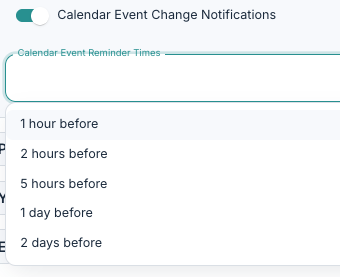
- Calendar Event Change Notifications is the master switch, and is on unless your organisation has switched it off. When off, no created / updated / cancelled notifications are sent for calendar appointments in the organisation, and no reminders are sent either.
- Calendar Event Reminder Times sets when patients are reminded before an appointment. You can select one or more of 1 hour before, 2 hours before, 5 hours before, 1 day before and 2 days before. If none is selected, no reminders are sent for new appointments.
Changing the reminder times rebuilds the pending reminders for every future appointment that uses the organisation default, so new settings apply to upcoming appointments as well. Appointments that have their own reminder times are not changed.
Please note: appointments carried across from the previous calendar in release 2026-R10 kept their original reminders. If Calendar Event Change Notifications is switched off and then on again, those carried-across reminders are not restored. Only the times selected under Calendar Event Reminder Times apply from then on.
Notifications for therapists
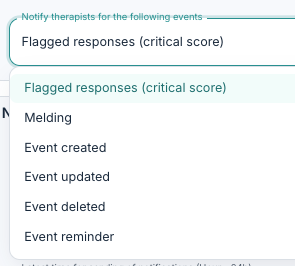
You can also choose which calendar notifications are sent to therapists in your organisation. Under Therapist, Notify therapists for the following events offers Event created, Event updated, Event deleted and Event reminder. The same reminder times as for patients apply to the event reminders activated here.
When an appointment is created, the patient's therapists also get a Calendar event entry in the Notifications Centre, if the Notifications Centre is switched on for your organisation. This entry is not affected by Calendar Event Change Notifications.
How the patient is notified
The channel used to deliver a notification (in-app, email, SMS or push) is decided per patient based on the patient's notification preferences in their profile, just as with all other notification types.